How to Share Photos With Just a Link: Zero Apps, Zero Accounts

Last Updated: September 22, 2026
Table of Contents
- How Can I Share Photos With Someone Using Just a Link?
- The Problem With Traditional Photo Sharing Apps
- App Store Friction Kills Group Participation
- Account Fatigue & Privacy Risks
- Messaging Apps Compress Your Photos
- 4 Ways to Share Photos With a Link (And How They Compare)
- How to Create a Link to Share Photos on Android
- Generic File Links vs. Dedicated Photo Sharing Links
- The 3-Step Guide to Upload and Share Photos With a Link
- Step 1: Create Your Album in 10 Seconds
- Step 2: Upload Your Photos
- Step 3: Copy & Send the Instant Link
- The Bottom Line
Imagine this: You just took 50 great photos at a family dinner, weekend trip, or birthday party. You want to share them with everyone.
So you tap “Share” on your phone, only to hit a wall of friction:
- Texting them destroys the quality and turns them into pixelated thumbnails.
- AirDrop fails because half the group uses Android.
- iCloud Shared Albums demand that everyone sign in with an Apple ID.
- Google Photos forces guests to download an app they don’t want.
What should take five seconds turns into a tech support session.
The solution is simple: share photos with a link. No app downloads. No account registration for recipients. No ecosystem walls.
Here is how instant link-based photo sharing online works, why traditional apps fail, and how to upload and send full-resolution photos using just a web link.
How Can I Share Photos With Someone Using Just a Link?
Sharing photos via a link is the most universal, cross-platform method available today.
Instead of sending heavy image files through messaging channels, you upload your photos to a secure web album that generates a unique URL (e.g., sharethepic.app/join/xyz).
When you text or email that link:
- The recipient taps the URL on their phone or laptop.
- The album opens instantly inside their default web browser (Safari, Chrome, Samsung Internet).
- They can view the full gallery, contribute their own photos, or download the originals in one click.
Because the process runs entirely in a web browser, it works across every device (iPhone, Android, iPad, Mac, and Windows PC).
The Problem With Traditional Photo Sharing Apps
For years, big tech platforms tried to trap photo sharing inside their proprietary ecosystems. But in 2026, user behavior has shifted dramatically away from heavy apps toward frictionless web links.
App Store Friction Kills Group Participation
When you ask a group of friends to download an app just to view 20 photos, participation drops through the floor.
Downloading an app requires:
- Searching the App Store or Google Play.
- Waiting for an 80MB download over cellular data.
- Creating a password and verifying an email address.
- Granting permissions to access their device storage.
Faced with those steps, 8 out of 10 people close the prompt and promise to “do it later.”
Account Fatigue & Privacy Risks
People are tired of creating accounts for one-off tasks. Every new account is another password to manage and another database holding personal personal data.
Furthermore, traditional social media platforms (like Instagram or Facebook) treat your photos as public engagement content. Photos posted to social feeds are compressed, indexed, and often used to train public algorithms.
A private link gives you total control over who sees your memories without making them public.
Messaging Apps Compress Your Photos
If you bypass apps and send photos directly through WhatsApp, Telegram, or SMS, messaging algorithms shrink your files by up to 80% to save server bandwidth. Fine detail disappears, colors bleed, and printing the photo later becomes impossible.
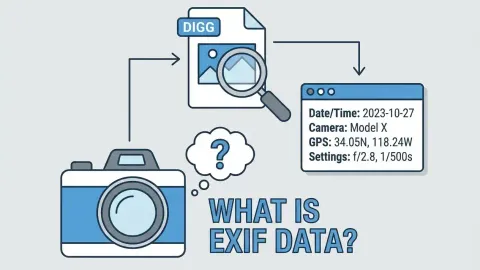
Furthermore, messaging apps strip EXIF metadata, erasing the original date and time the photo was taken. Your photos lose their chronological timeline and get sorted by upload time instead.
4 Ways to Share Photos With a Link (And How They Compare)
Not all link sharing tools are built equal. Here is how the main methods compare:
| Method | No App Needed? | Full Original Quality? | Interactive Group Uploads? | Timeline Sorting? |
|---|---|---|---|---|
| Messaging Apps (WhatsApp / iMessage) | Yes | No (Compressed 80%) | No (Disorganized chat dump) | No (Metadata stripped) |
| Generic File Transfers (WeTransfer / Dropbox) | Yes | Yes | No (Static zip download) | No (Messy file names) |
| Cloud Storage (Google Photos / iCloud) | No (Requires login) | Yes (If configured) | Partial (Ecosystem locked) | Yes |
| ShareThePic | Yes (100% Web-Based) | Yes (100% Original Size) | Yes (Anyone can contribute) | Yes (EXIF Capture Time) |
How to Create a Link to Share Photos on Android
Android makes this easier than most people expect, since you don’t need Google Photos or a Samsung-specific tool:
- Open any browser on your phone. Chrome, Samsung Internet, or Firefox all work the same way.
- Go to web.sharethepic.app and tap “Create Album.” Name it whatever your group will recognize.
- Add photos from your Android gallery and copy the link. Paste it into WhatsApp, Messages, email, or anywhere else. iPhone and Android recipients open the exact same link, no Google account or app install required on either side.
Generic File Links vs. Dedicated Photo Sharing Links
Many people turn to file transfer sites like WeTransfer or Dropbox when they want to share photos with a link.
While generic file transfer sites avoid image compression, they deliver a terrible viewing experience:
- Photos appear as a raw list of file names (
IMG_4092.JPG). - Recipients cannot preview photos in a visual gallery before downloading.
- Other people cannot add their own photos to the collection.
A dedicated instant photo sharing link gives you the best of both worlds: uncompressed original files delivered inside a beautiful, interactive web gallery.
The 3-Step Guide to Upload and Share Photos With a Link
Here is how to set up an uncompressed, zero-app photo link using ShareThePic:
Step 1: Create Your Album in 10 Seconds
Go to web.sharethepic.app on your phone or computer browser. Tap “Create Album.” Give your album a name (e.g., “Summer Road Trip 2026”).
You don’t need to install software or configure complex settings.
Step 2: Upload Your Photos
Share photos drag and drop directly from your desktop browser, or tap the file picker on your smartphone.
ShareThePic uploads your photos at 100% original camera resolution while generating fast WebP previews for smooth gallery viewing. EXIF metadata (including original capture dates and GPS tags) is preserved automatically.
Step 3: Copy & Send the Instant Link
Copy your unique album URL and share it anywhere:
- Paste it into your family WhatsApp or iMessage group chat.
- Email it to relatives.
- Display the automatically generated QR code on a screen or table card at an event.
Recipients tap the link, instantly browse the full-resolution album in Safari or Chrome, and download the entire collection in one click.
If you want others to contribute, they can tap “Upload” and add their own photos directly from their browser without downloading an app.
The Bottom Line
You shouldn’t need a tech degree or a forced app download to send memories to the people you care about.
Next time you need to upload and share photos with link, skip the compressed group chats and heavy app installs.
Create your free shared photo album in 10 seconds and share your memories in original quality with just one link.
Frequently Asked Questions
How can I share photos with someone using just a link?
How can I share photos with someone using just a link?
The fastest way is to use a web-native photo album tool like ShareThePic. You create an album in seconds, copy the unique link, and send it to anyone via text, email, or messaging apps. Recipients click the link and view or upload photos directly from their web browser without downloading an app.
Can I share full resolution photos with a link without an app?
Can I share full resolution photos with a link without an app?
Yes. Purpose-built browser platforms preserve 100% of original camera file resolution and EXIF metadata when sharing via a link, unlike messaging apps which compress image quality by up to 80%.
Do recipients need an account to view or download photos from a link?
Do recipients need an account to view or download photos from a link?
No. With ShareThePic, recipients can open the link in any browser (Safari, Chrome, Samsung Internet) to view the gallery or download full-resolution original files without creating an account or signing in.
Why is link-based photo sharing better than WhatsApp or text messages?
Why is link-based photo sharing better than WhatsApp or text messages?
Sending photos through text or WhatsApp applies aggressive image compression, strips EXIF capture dates, and buries photos under chat messages. A shared link opens a clean, organized gallery that maintains original photo quality and chronological sorting.
How do I create a link to share photos on Android?
How do I create a link to share photos on Android?
Open any browser on your Android phone (Chrome or Samsung Internet both work), go to web.sharethepic.app, and tap 'Create Album.' Add your photos from your Android gallery, then copy the generated link and send it however you like. No app install needed on your end or the recipient's.