How Photo Compression Silently Destroys Your Travel Memories (And How to Stop It)

Last Updated: September 3, 2026
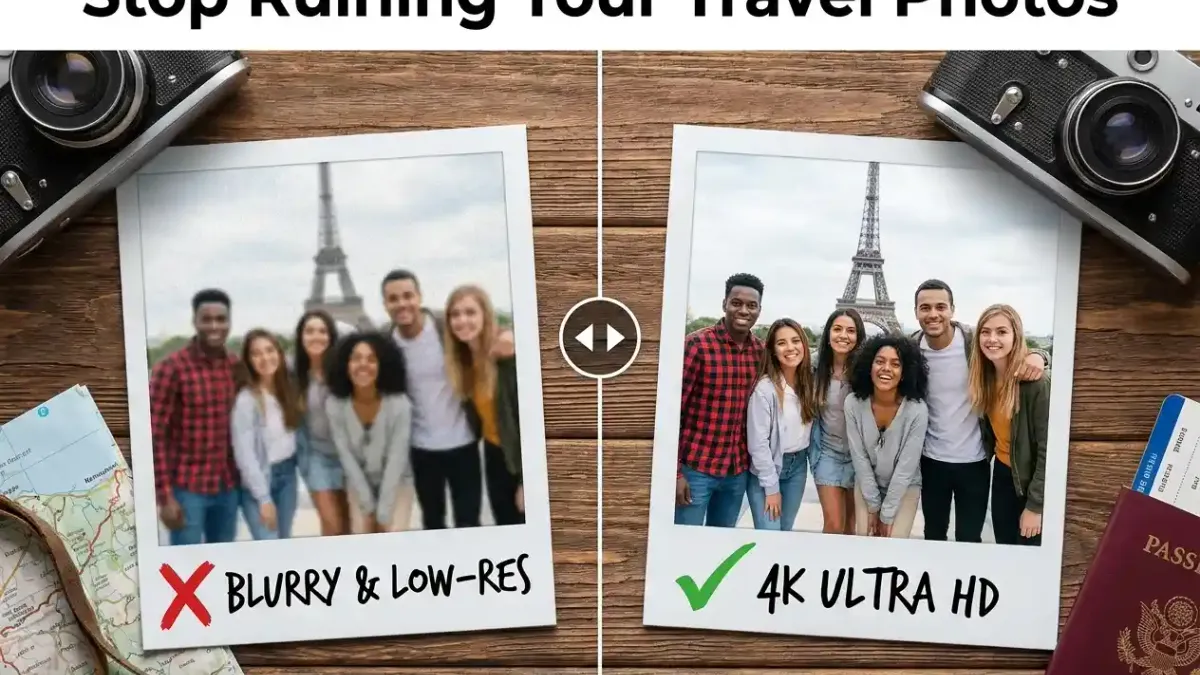
Table of Contents
- The Moment Your Photo Gets Ruined
- What Compression Actually Does to Your Image
- The Compounding Compression Trap
- The Biggest Offenders Ranked
- WhatsApp: Even “HD” Mode Isn’t What You Think
- iMessage: Better, But Not Perfect
- Email: Surprisingly Bad for Batches
- Social Media: Never Share Originals via Instagram or Facebook
- What Compression Steals Beyond Pixels
- Your EXIF Data (and Why It Matters for Trip Albums)
- How Your Photo Timeline Gets Scrambled
- How to Actually Share Travel Photos Without Losing a Single Pixel
- The WhatsApp “Document” Workaround (And Why It’s Clunky)
- Cloud Folders: Good, But Complicated for Groups
- ShareThePic: The Zero-Friction, No-Compression Method
- The Group Trip Scenario - When It Gets Really Messy
- iPhone + Android in the Same Group
- One Link, Everyone Uploads, No App Required
- Quick Checklist Before Your Next Trip
You spent ten days in Portugal. You hiked to a viewpoint at sunrise, waited for the light to hit just right, and got the shot. Back at the villa, you texted it to the group chat so everyone could see.
By the time it arrived on their phones, that photo was already a shadow of itself.
This is what compression does. It happens invisibly, it happens instantly, and most people have no idea it’s occurring until they try to print a photo and realize the details they saw through the viewfinder are simply gone.
The Moment Your Photo Gets Ruined
What Compression Actually Does to Your Image
When you take a photo on a modern iPhone or Android flagship, you’re capturing a 10, 15, even 50-megapixel image with rich colour depth and fine spatial detail. That file might be 4 to 8 MB.
When you send it through WhatsApp using the default setting, the app shrinks that file to under 1 MB. It throws away data, permanently. The fine grain of a stone wall, the individual leaves in a tree canopy, the sharp edge of a person’s face at the frame’s edge all softened or lost.
This isn’t a bug. It’s a deliberate design choice. WhatsApp is built for fast communication on variable mobile networks. The goal is speed, not archival quality. Those are two entirely different objectives, and most people forget that when they use a messaging app to share photos they genuinely care about.
The Compounding Compression Trap
Here’s the scenario nobody warns you about: one person sends a photo through WhatsApp (compressed). A second person screenshots it on their phone (compressed again, plus cropped to the screen resolution). They forward the screenshot to someone else who missed the trip (compressed a third time).
Three rounds of lossy compression on what was originally a stunning 12-megapixel image. At this point you’re sharing something that belongs in a ’90s internet forum, not a travel memory.
Each re-encoding destroys a little more. This is why you should never compress a photo more than once, and why you should absolutely never share a screenshot of a photo as though it’s the original.
The Biggest Offenders Ranked
WhatsApp: Even “HD” Mode Isn’t What You Think
WhatsApp introduced an HD quality option that sounds like a solution. It isn’t not fully.
When you select HD before sending, you get a noticeably better result than the default. But “better than default” isn’t the same as “original quality.” WhatsApp’s HD mode still processes the image; your 8 MB original does not arrive as 8 MB on the other end.
There is one legitimate workaround: send photos as a Document instead of as a Photo. In WhatsApp, tap the attachment icon, choose Document, then navigate to your photo. This bypasses the image processing pipeline entirely and sends the actual original file.
The catch? It’s clunky. It works fine for one or two photos. If you’re trying to share 200 shots from a 10-day trip to a group of 12 people across multiple WhatsApp chats, you will lose your mind before you finish.
iMessage: Better, But Not Perfect
The most common question in mixed travel groups: how do you share photos between Android and iPhone without compression? The honest answer is that iMessage gets you partway there, but only if everyone is on Apple hardware.
iMessage is more forgiving than WhatsApp when both sender and receiver have iPhones with high-quality mode enabled. But step outside that ecosystem (i.e. send to an Android phone, add someone on RCS, or route through a carrier) and you’re back to compressed territory.
More importantly, iMessage was never designed for group photo collection. It’s a 1-to-1 (or 1-to-small-group) tool. Asking it to coordinate 50+ photos from 15 people who attended your cousin’s wedding is like using a coffee mug as a mixing bowl. Technically possible, practically painful.
Email: Surprisingly Bad for Batches
Individual photo attachments through email can preserve quality, especially if the client doesn’t auto-resize. But most people hit attachment limits instantly (Gmail caps attachments at 25 MB) and end up either compressing the photos themselves to fit under the limit, or splitting the batch into a dozen separate emails that no one can manage.
For a travel group of 8 people, each with 150 photos, this is not a viable system.
Social Media: Never Share Originals via Instagram or Facebook
If quality matters at all, don’t use Instagram or Facebook to distribute your original travel photos. Both platforms run aggressive compression algorithms and downscale images to a fraction of their original resolution for display. They’re built for browsing feeds, not archiving memories.
Share the trip album publicly if you want, but always from a source that still holds the originals, never by uploading directly and pointing people to the platform as the authoritative copy.
What Compression Steals Beyond Pixels
Quality loss is the obvious problem. But there’s a subtler one that hits travellers specifically, and almost nobody talks about it.
Your EXIF Data (and Why It Matters for Trip Albums)
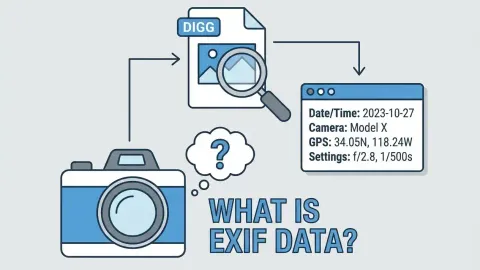
Every photo your phone takes contains invisible metadata embedded in the file. This is called EXIF data, and for travel photography, it’s everything:
- Capture date and time, when exactly you took each shot
- GPS coordinates, where you were standing when you pressed the shutter
- Camera settings, aperture, ISO, shutter speed
- Device make and model, which phone or camera captured the image
When WhatsApp, Facebook Messenger, or most messaging apps compress your photo, they strip this metadata. The date, the location, gone. Your phone’s gallery might still know (it keeps a local copy), but the compressed version that reached your friends’ phones is a metadata-free file.
How Your Photo Timeline Gets Scrambled
Here’s why this matters: when you try to collect everyone’s trip photos into a single album - whether you use a cloud folder, a shared album, or any group tool - the album has to figure out the correct order to display them in.
If the photos have their EXIF timestamps intact, the album can sort them chronologically: the sunrise hike photos appear before the afternoon beach shots, which appear before the dinner photos. The trip tells itself as a story.
If the metadata was stripped, the album has no timestamp to rely on. It falls back to the “file received date”, which is the moment you downloaded or saved the compressed version. Now your album shows your dinner first, because you saved those to your phone before the hike photos arrived from the group chat.
Two hundred photos sorted in effectively random order. A scrambled timeline of a trip you loved.
How to Actually Share Travel Photos Without Losing a Single Pixel
The WhatsApp “Document” Workaround (And Why It’s Clunky)
As noted above, sending photos as Documents in WhatsApp does preserve the original file. If you’re sharing one or two specific shots with a single person, it’s fine.
For anything beyond that a trip with more than a couple of people, more than a handful of photos, or any expectation that friends will also contribute their own shots, the Document workaround breaks down fast. There’s no gallery view, no way to browse 200 files you received as Documents, no way for 10 people to all add their photos into one organised space.
Cloud Folders: Good, But Complicated for Groups
Shared folders on Google Drive or Dropbox preserve original quality. If you upload a photo to Google Drive and share a link with someone who downloads it from that link, they get the original file. No compression in transit.
The problems are organisational: you need everyone to have accounts (or be comfortable with the link permissions flow), you need to agree on a folder structure, and crucially if you want everyone to contribute their photos, each person has to upload manually to the folder and remember to do it before they forget the trip existed.
The collection step is where this falls apart. You end up spending weeks chasing people for their photos, reminded three times via text, and still missing the shots from the friend who doesn’t check email.
ShareThePic: The Zero-Friction, No-Compression Method
ShareThePic was built specifically for this problem: collect photos from a mixed group (iPhones, Androids, cameras, all of it) without compressing anything and without making anyone download an app or create an account just to contribute.
Here’s what actually happens:
- You create a free shared album in 10 seconds. You get a link and a QR code.
- You share that link with your travel group via WhatsApp, iMessage, email, anywhere.
- Every guest clicks the link and uploads their photos directly from their mobile browser, no install required.
- Every photo lands in the album at its original resolution. No compression is applied. The EXIF metadata (including capture timestamp and GPS coordinates) is preserved in the original files.
- The album auto-sorts in chronological order using those timestamps. Your trip tells itself as a story.
When someone downloads photos from ShareThePic, they get the uncompressed originals in a single zip file. No quality loss at any point in the chain.
Create your free shared photo album
The Group Trip Scenario - When It Gets Really Messy
The compression problem multiplies when you add more people and more devices. A solo traveller can manage their own photos. A group of 12 from three different countries with a mix of iPhones, Androids, and a DSLR is a different problem entirely.
iPhone + Android in the Same Group
AirDrop doesn’t work across platforms, so your iOS friends can’t directly send to your Android friends. Everyone defaults to WhatsApp. The Android users might be on older phones that default to even more aggressive compression than newer ones. The one person with a DSLR tries emailing RAW files to the group and hits attachment limits on message two.
By the time the photos have circulated through the group chat, a significant portion of the visual quality captured on those devices has been quietly discarded.
One Link, Everyone Uploads, No App Required
The only workflow that actually solves the mixed-group problem is one where everyone contributes their photos into a single place without friction, and where that place doesn’t touch the original files.
ShareThePic’s model: you share one link. Each person uploads once, from whatever device they’re using, directly in their browser. The photos are stored at original quality. You get everything in one place, sorted correctly, downloadable at full resolution.
No chasing. No “can you send me your photos from the trip?” texts sent three months later. No degraded thumbnails masquerading as memories.
Next time you’re back from a trip, skip the group chat for photo sharing. Start a free album here and watch the photos fill in while you’re still unpacking.
Quick Checklist Before Your Next Trip
Use this before you leave so you’re not scrambling to recover compressed photos after:
- Pick your collection tool before you go. Set up a ShareThePic album and share the link in the group chat before the trip starts, not after.
- Never use messaging apps to distribute originals. WhatsApp and iMessage are for communicating, not archiving.
- Brief your group once. Tell them where the album link is and ask them to upload directly, not to send photos through the group chat.
- Keep your own originals backed up. Whether you use iCloud, Google Photos, or a local hard drive, keep a full-resolution local copy of everything you shot.
- Download from the album, not from the chat. When you save group photos to your own library, download from the source album, not from screenshots or forwarded messages.
The shots you took on that sunrise hike are worth protecting. They’re not expendable data. Treat them accordingly.
ShareThePic lets you collect full-resolution photos from your entire travel group without making anyone install an app. Set up your free album in 10 seconds.
Frequently Asked Questions
How can I share photos without any compression or quality loss?
How can I share photos without any compression or quality loss?
Use a dedicated photo sharing platform like ShareThePic, which stores and shares your photos in their original resolution with no compression applied. Alternatively, share via a cloud folder link (Google Drive, Dropbox) and instruct recipients to download directly, or send photos through WhatsApp as a Document (not as a photo) to bypass its compression algorithm.
Does WhatsApp HD mode preserve full photo quality?
Does WhatsApp HD mode preserve full photo quality?
No. WhatsApp's HD mode improves quality compared to the default setting, but it still compresses images. The HD option reduces file sizes significantly from the original. Only sending photos as a 'Document' through WhatsApp transmits the truly uncompressed, original file.
How does photo compression affect travel photos specifically?
How does photo compression affect travel photos specifically?
Travel photos are especially vulnerable because they capture irreplaceable, once-in-a-lifetime moments you cannot reshoot. Compression reduces visible detail (fine textures, distant landscapes, faces), strips EXIF metadata including GPS location and capture timestamps, and if photos are compressed multiple times through re-sharing, quality degrades further with each pass.
What happens to EXIF data when you send photos through messaging apps?
What happens to EXIF data when you send photos through messaging apps?
Most messaging apps, including WhatsApp and Facebook Messenger, strip EXIF metadata from photos during compression. This means your photos lose their embedded capture date, time, GPS coordinates, and camera settings. For travel albums, this scrambles the chronological order of your memories and removes the location data that makes trip timelines meaningful.